MySQL 主从复制
MySQL 主从复制
概述
安装MySQL
1
2
3
4
5
6
7
8
wget  https://dev.mysql.com/get/mysql80-community-release-el7-7.noarch.rpm
yum -y install  mysql80-community-release-el7-7.noarch.rpm
yum clean all && yum makecache
yum-config-manager --disable mysql80-community
yum-config-manager --enable mysql57-community
yum repolist enabled | grep mysql
yum -y  install mysql-community-server
systemctl enable mysqld --now
配置主从
1
2
3
[root@master ~]# mysql --version

[root@master ~]# grep 'password' /var/log/mysqld.log

3. 修改主库配置文件:
1
2
3
4
5
6
7
8
9
10
11
12
13
14
15
vim /etc/my.cnf
# master增加如下配置
server_id=131  # 需要保证唯一性 不可与其他从服务器相同 如果为0会拒绝所有从服务器连接
log-bin=mysql-bin # 设置同步的binary log二进制日志文件名前缀,默认是binlog
# 可选配置
binlog-format=row  # 主从复制的格式(mixed,statement,row,默认格式是statement。建议是设置为row,主从复制时数据更加能够统一)

expire_logs_days = 10 # 二进制日志自动删除/过期的天数。默认值为0,表示不自动删除。
max_binlog_size = 100M # 日志最大大小
binlog_do_db = test   # 需要同步的数据库
binlog_ignore_db = mysql  # 不需要同步的数据库

# 跳过主从复制中遇到的所有错误或指定类型的错误,避免slave端复制中断。
# 如:1062错误是指一些主键重复,1032错误是因为主从数据库数据不一致
slave_skip_errors=1062
4. 修改从库配置文件:
1
2
3
4
5
6
7
8
9
10
11
12
13
14
# slave增加如下配置
server_id=96  # 需要保证唯一性 不可与其他从服务器相同 如果为0会拒绝所有从服务器连接
log-bin=mysql-bin # 设置同步的binary log二进制日志文件名前缀,默认是binlog
# 可选配置
binlog-format=row  # 主从复制的格式(mixed,statement,row,默认格式是statement。建议是设置为row,主从复制时数据更加能够统一)

expire_logs_days = 10 # 二进制日志自动删除/过期的天数。默认值为0,表示不自动删除。
max_binlog_size = 100M # 日志最大大小
binlog_do_db = test   # 需要同步的数据库
binlog_ignore_db = mysql  # 不需要同步的数据库

# 跳过主从复制中遇到的所有错误或指定类型的错误,避免slave端复制中断。
# 如:1062错误是指一些主键重复,1032错误是因为主从数据库数据不一致
slave_skip_errors=1062
5. 重启主库开始配置:
1
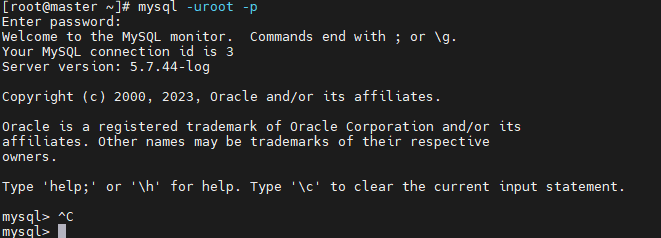
[root@master ~]# systemctl restart mysqld
1
2
3
4
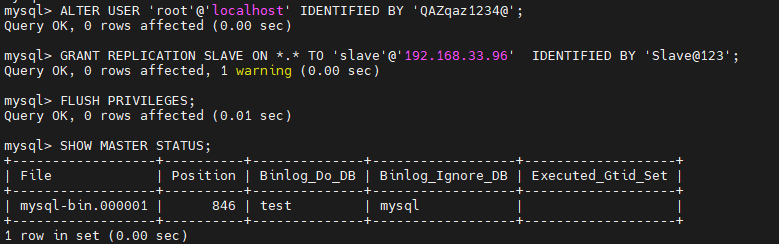
mysql> ALTER USER 'root'@'localhost' IDENTIFIED BY 'QAZqaz1234@';
mysql> GRANT REPLICATION SLAVE ON *.* TO 'slave'@'192.168.33.96'  IDENTIFIED BY 'Slave@123';
mysql> FLUSH PRIVILEGES;
mysql> SHOW MASTER STATUS;
6. 创建测试数据:
1
2
3
4
5
mysql> create database test;
mysql> use test
mysql> create table mytest(id int(10),name varchar(20),age int(10));
mysql> insert into mytest(id,name,age) values (1,'tom',23);
mysql> select * from mytest;

7. 重启从库开始配置:
1
2
3
4
5
6
7
8
9
mysql> ALTER USER 'root'@'localhost' IDENTIFIED BY 'QAZqaz1234@';
mysql> CHANGE MASTER TO MASTER_HOST = '192.168.33.131',
MASTER_PORT = 3306,
MASTER_USER = 'slave',
MASTER_PASSWORD = 'Slave@123',
MASTER_LOG_FILE = 'mysql-bin.000001',
MASTER_LOG_POS = 846;
# MASTER_LOG_FILE = 'mysql-bin.000001'为File
# MASTER_LOG_POS = 846  为Position
8. 开始同步:
1
2
mysql> START SLAVE;
mysql> FLUSH PRIVILEGES;
9. 查看状态:
1
2
3
4
5
6
7
8
9
10
11
12
13
14
15
16
17
18
19
20
21
22
23
24
25
26
27
28
29
30
31
32
33
34
35
36
37
38
39
40
41
42
43
44
45
46
47
48
49
50
51
52
53
54
55
56
57
58
59
60
mysql> SHOW SLAVE STATUS\G
*************************** 1. row ***************************
               Slave_IO_State: Waiting for master to send event
                  Master_Host: 192.168.33.131
                  Master_User: slave
                  Master_Port: 3306
                Connect_Retry: 60
              Master_Log_File: mysql-bin.000001
          Read_Master_Log_Pos: 1473
               Relay_Log_File: node-relay-bin.000002
                Relay_Log_Pos: 947
        Relay_Master_Log_File: mysql-bin.000001
             Slave_IO_Running: Yes
            Slave_SQL_Running: Yes
              Replicate_Do_DB:
          Replicate_Ignore_DB:
           Replicate_Do_Table:
       Replicate_Ignore_Table:
      Replicate_Wild_Do_Table:
  Replicate_Wild_Ignore_Table:
                   Last_Errno: 0
                   Last_Error:
                 Skip_Counter: 0
          Exec_Master_Log_Pos: 1473
              Relay_Log_Space: 1153
              Until_Condition: None
               Until_Log_File:
                Until_Log_Pos: 0
           Master_SSL_Allowed: No
           Master_SSL_CA_File:
           Master_SSL_CA_Path:
              Master_SSL_Cert:
            Master_SSL_Cipher:
               Master_SSL_Key:
        Seconds_Behind_Master: 0
Master_SSL_Verify_Server_Cert: No
                Last_IO_Errno: 0
                Last_IO_Error:
               Last_SQL_Errno: 0
               Last_SQL_Error:
  Replicate_Ignore_Server_Ids:
             Master_Server_Id: 146
                  Master_UUID: 0df2fba7-9bdc-11ee-8241-000c294ec152
             Master_Info_File: /var/lib/mysql/master.info
                    SQL_Delay: 0
          SQL_Remaining_Delay: NULL
      Slave_SQL_Running_State: Slave has read all relay log; waiting for more updates
           Master_Retry_Count: 86400
                  Master_Bind:
      Last_IO_Error_Timestamp:
     Last_SQL_Error_Timestamp:
               Master_SSL_Crl:
           Master_SSL_Crlpath:
           Retrieved_Gtid_Set:
            Executed_Gtid_Set:
                Auto_Position: 0
         Replicate_Rewrite_DB:
                 Channel_Name:
           Master_TLS_Version:
1 row in set (0.00 sec)
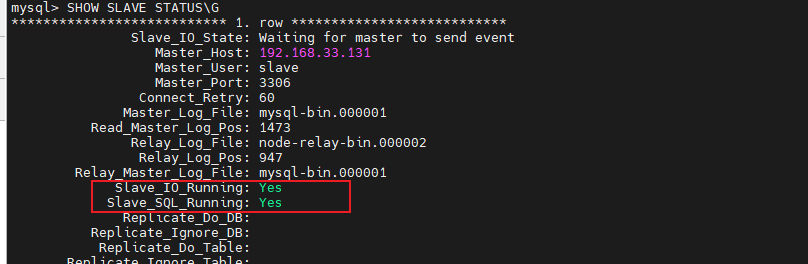
都显示Yes表示成功
验证数据
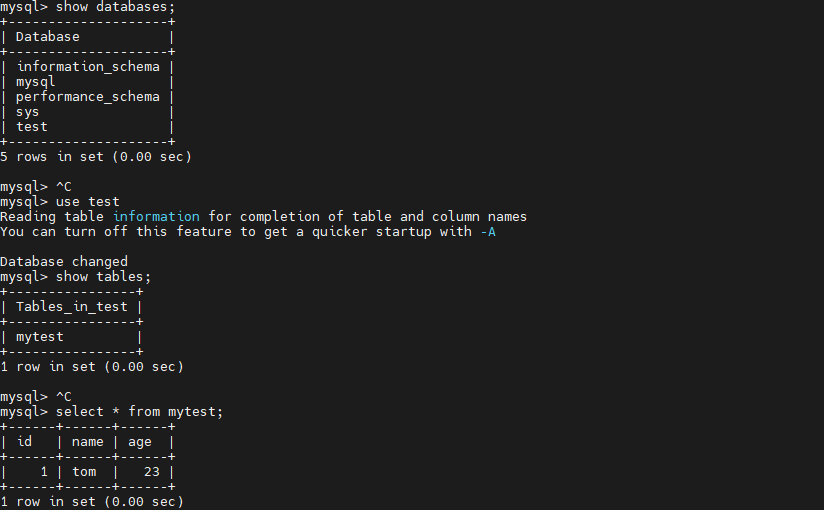
在从库查询能查询到主库刚刚创建的数据即成功
1
2
3
4
5
6
7
8
9
10
11
12
13
14
15
16
17
18
19
20
21
22
23
24
25
26
27
28
29
30
31
32
mysql> show databases;
+--------------------+
| Database           |
+--------------------+
| information_schema |
| mysql              |
| performance_schema |
| sys                |
| test               |
+--------------------+
5 rows in set (0.00 sec)

mysql> use test
Reading table information for completion of table and column names
You can turn off this feature to get a quicker startup with -A

Database changed
mysql> show tables;
+----------------+
| Tables_in_test |
+----------------+
| mytest         |
+----------------+
1 row in set (0.00 sec)

mysql> select * from mytest;
+------+------+------+
| id   | name | age  |
+------+------+------+
|    1 | tom  |   23 |
+------+------+------+
1 row in set (0.00 sec)
主库增加一条数据:

从库查询: 
11. 命令扩展:
1
2
3
mysql> STOP SLAVE;  # 停止主从复制
mysql> RESTART SLAVE;  # 重启主从复制
mysql> RESET  SLAVE;  # 重置主从复制状态
本文由作者按照 CC BY 4.0 进行授权